Best Fish Finders for Offshore Kayak Fishing: Why the Maximum Depth Rating Isn't the Number That Decides What You'll See
You're two miles past the last marker with a hard return over structure you marked last season, and you can't tell if that smear on the screen is bait, a thermocline, or something else, while the battery gauge is already sliding faster than the trip plan assumed.
The quick answer
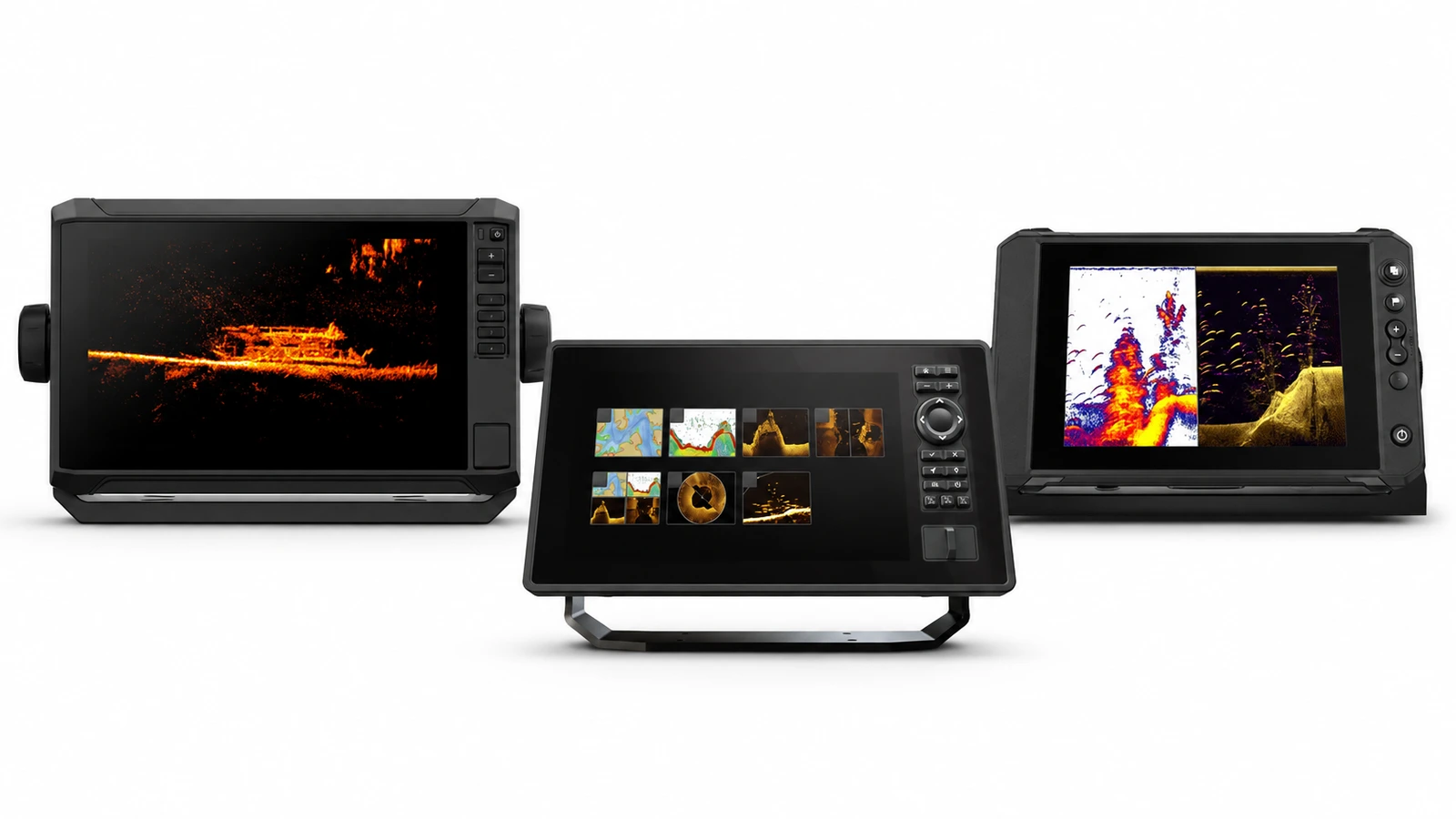
The Garmin ECHOMAP UHD2 74sv or 94sv is the best fish finder for most offshore kayak anglers. One head-unit family covers both a 7 inch and a 9 inch body, so the cockpit-fit decision and the sonar decision stay separate, and the transducer and regional chart package are chosen for the depth you actually fish rather than inherited from a bundle. Anglers who want a fully specified package out of the box should buy the Humminbird XPLORE 9 instead, which names its XM 14 HW CMSI T transducer and LakeMaster/CoastMaster map card up front on a 1280 x 720 display.
Everything below is judged on one question: what a specific transducer will show at your fishing depth, not what maximum depth is printed on the box.
Affiliate disclosure. ReefReadyGear earns a commission on some links below at no extra cost to you. This guide draws on manufacturer product pages, installation and support documentation, checked September 12, 2026, and it is a researched buying guide rather than a claim of first-hand testing.
A depth number is not a promise
The figure printed on the box describes one sounder paired with one transducer under favorable conditions. It says nothing about what a specific transducer, installed on your kayak, will actually show at the depth you fish.
The three awards
The three at a glance
| If you want | Consider | Why |
|---|---|---|
| A chart/sonar split sized to your cockpit | Garmin ECHOMAP UHD2 74sv or 94sv | Two screen sizes on one head-unit family, with the transducer and coastal chart region chosen separately for your fishing depth |
| Imaging with a defined expansion path | Lowrance Elite FS 7 or 9 | An included Active Imaging 3-in-1 transducer in the regional package reviewed, with live sonar as separately priced hardware rather than a built-in upgrade |
| A complete charted package with published contents | Humminbird XPLORE 9 | A named transducer (XM 14 HW CMSI T) and LakeMaster/CoastMaster map card in the reviewed CMSI+ package, at a stated 1280 x 720 resolution |
On this page
- The quick answer
- The three awards
- The three at a glance
- How we chose
- What a depth rating actually means
- How many hours will the display actually run
- What a bigger screen and added sonar cost you elsewhere
- Transducer mount and hull clearance
- The best fish finders for offshore kayak fishing
- Garmin ECHOMAP UHD2 74sv / 94sv
- Lowrance Elite FS 7 / 9
- Humminbird XPLORE 9
- Where each candidate sits on screen size and power draw
- Do you need a dedicated offshore unit, or would a smaller one do?
- Frequently asked questions
- Final verdict
- Related reading
- Sources
How we chose
ReefReadyGear does not run a testing programme, and nothing here is presented as a first-hand result. Every specification is drawn from manufacturer product, installation and support pages, verified September 2026. Where a figure is our calculation rather than a published one, it's labelled as ours with the method shown.
- Sonar capability and screen size are checked as separate specifications, never treated as one number
- Battery runtime is calculated explicitly in amp-hours, not left for the reader to discover mid-trip
- A transducer's rated maximum depth is never presented as a guaranteed fishing depth for a kayak installation
- Where a manufacturer's own documentation qualifies a claim, that qualification travels with the recommendation
- Where two package descriptions could plausibly differ by market, that's stated rather than assumed away
Where two authoritative sources disagree, both are quoted and attributed rather than blended, and where a maker publishes no figure at all we say so instead of estimating quietly.
Every fish finder box promises a maximum reading depth in the thousands of feet, a screen wide enough to run chart and sonar side by side, and enough water-column detail to sort bait from bottom clutter at a glance. Two of those numbers say almost nothing about what you'll actually see over a specific piece of structure from a kayak seat, and the third gets tested continuously against the trip's real power budget the moment you leave the ramp.
A depth rating is a laboratory number for the sounder, paired with a specific transducer, in favorable water, not a guarantee for your hull at your fishing depth. Garmin's own installation documentation conditions attainable sonar depth on the transducer used and the water conditions present, and that qualification belongs on every recommendation in this guide, including the most expensive one. The trade that actually decides the purchase is between how much sonar and screen capability you carry and how many hours that capability can run on a battery a kayak can physically hold. Every added inch of screen, every added imaging mode, and every added live-sonar module pulls more from the same limited footprint, and no manufacturer prints the runtime math that connects the two.
This guide runs that runtime math in amp-hours instead of leaving it as a spec-sheet abstraction, separates a display's rated maximum depth from what a specific transducer and installation will actually show at your depth, and walks through the mount and fit check that decides whether a shortlisted unit works from your kayak seat at all, using manufacturer documentation checked September 12, 2026.
What a depth rating actually means
A fish finder's printed maximum depth describes the sounder and one compatible transducer under favorable conditions, not what you will see fishing a specific piece of structure from a kayak. Garmin's installation documentation explicitly ties attainable sonar depth to the transducer installed and the water conditions present, which means the same head unit can read very differently depending on what's bolted underneath it.
Nearshore bait and structure work asks for suitable traditional sonar and a scale you can actually read while paddling or pedaling into position, with waypoint marking as a secondary convenience rather than the deciding feature.
Reef and known-structure fishing asks for consistent, useful returns at the one depth you actually fish that spot, with chart and sonar shown together so you can hold position relative to the structure rather than just its depth number.
Deep vertical jigging asks for a sounder and transducer combination specifically suited to that depth and a workable kayak mounting method, since a transom transducer rated for shallower water doesn't become suitable for depth simply because the display says it can read further down.
If a seller's answer to "how deep does this read" is only "this unit reads thousands of feet," ask which transducer and which conditions support that number. The display's maximum specification is not the same as useful fish detail from your actual installation, and Garmin's own documentation says so before any retailer does.
How many hours will the display actually run: our battery math
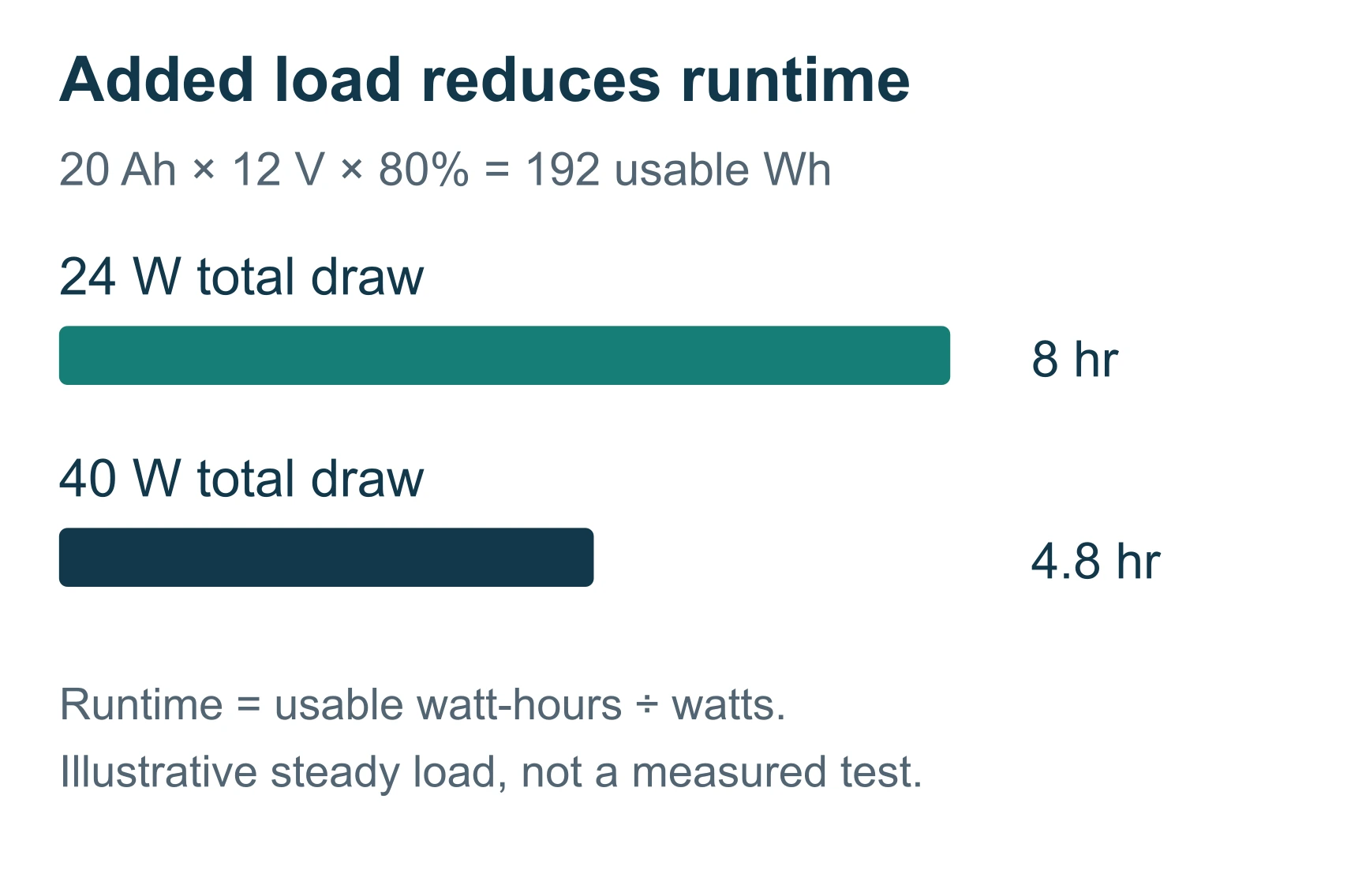
Every fish finder listing publishes sonar transmit power in RMS watts. Almost none publish what that translates to in hours of runtime from a kayak battery, because RMS transmit power and continuous battery draw are different specifications, and the gap between them is exactly the number a seller has no reason to volunteer.
The method
- List every device on the sonar circuit, the display, a separate sonar module if one is required, and any network accessories, and record each one's input voltage from the manufacturer's documentation.
- Measure or obtain the combined running load in watts at the brightness and sonar settings you actually use. This guide uses an illustrative 24 W setup, matching the scenario above.
- Convert watts to amps at the system's nominal voltage: amps = watts divided by volts. At 12 V, 24 W divided by 12 V equals 2 A.
- Multiply the amp draw by the planned trip length to find the amp-hours of energy the trip will pull: 2 A times 8 hours equals 16 Ah.
- Apply a conservative 80 percent usable-capacity ceiling, since many lithium batteries specify a safe depth of discharge below 100 percent, to find the rated battery capacity that actually covers the trip: 16 Ah divided by 0.8 equals 20 Ah.
Running the same inputs in watt-hours instead of amp-hours gives the same answer in different units: 24 W times 8 hours equals 192 Wh, and 192 Wh divided by 0.8 equals 240 Wh of nominal battery energy required. Either unit works, as long as it's the one printed on the battery you're actually buying.
These are illustrative inputs, not measured draw for any shortlisted unit or a universal reserve recommendation. Confirm the actual running watts for your display and any sonar module against its own documentation before sizing a battery.
The runtime table
| Rated battery capacity | Hours at a 24 W / 2 A illustrative draw | Hours at a 40 W / 3.3 A illustrative draw (display plus a live-sonar module) |
|---|---|---|
| 20 Ah | 8.0 | 4.8 |
| 30 Ah | 12.0 | 7.2 |
| 50 Ah | 20.0 | 12.0 |
This table is our calculation, not a manufacturer claim, using the 80 percent usable-capacity method shown above so you can rerun it with your own display's rated draw. The right-hand column exists because adding live sonar to an existing setup roughly doubles the illustrative draw in this worked example; if you plan to add a module later, recalculate the whole demand rather than assuming the original battery still covers the trip.
Two conditions make the real number worse than either column suggests. Cold weather reduces a battery's usable capacity below the manufacturer's rated figure, and a display run at maximum brightness under full sun draws more than the same unit run at a moderate setting. Build in margin beyond the 80 percent ceiling if either applies to your typical trip.
What a bigger screen and added sonar cost you elsewhere
A nine-inch head unit with an included imaging transducer and an optional live-sonar expansion looks like a strictly better purchase than a seven-inch display with basic CHIRP. It isn't a strictly better purchase. It's a different set of trade-offs, and every one of them is paid somewhere other than the spec sheet that lists the upgrade.
Battery draw rises with every added component. A separate sonar module, network accessories and a brighter or larger display all sit on the same power budget, and the manufacturer's instructions call for listing every device on that circuit before sizing the battery, not after installing it.
Deck space and mount footprint grow with screen size. A nine-inch unit needs a larger gimbal, more cable bend space at the back of the mount, and a bigger obstruction in the sightline of a paddle stroke or landing-net swing than a seven-inch unit in the same location.
Advertised compatibility is not included hardware. Lowrance's own Elite FS listing distinguishes Active Imaging capability, which is included, from live-sonar expansion, which requires additional hardware priced and installed separately. Price the expansion before you decide the base unit is affordable.
Choose the smaller, simpler package when your actual fishing is mostly one working view at one depth. Choose the larger package, and the added battery and deck-space cost that comes with it, only when a chart/sonar split or an imaging expansion path is a genuine, frequent working need rather than a feature you'd like to have available.
The overlooked check: transducer mount and hull clearance
Almost every buying comparison in this category stops at screen size and sonar mode. The check that actually determines whether the unit works on your kayak is whether the specific transducer's mounting hardware fits your hull, your paddle stroke and your landing-net swing, and it's rarely raised before the sale.
Inspect the exact transducer's dimensions and mounting requirements before ordering, not after it arrives. A transom transducer sized for a larger boat doesn't become a compact in-hull unit because an adhesive mount happens to be convenient, and Humminbird's own model-specific installation manuals, including for its compact MEGA imaging transducers, spell out the clearance and unobstructed-water requirements that apply to each one.
The thirty-second check almost nobody runs before buying: sit in your normal fishing seat, hold your paddle in one hand and mimic a landing-net scoop with the other, and trace the exact path a retractable transducer arm would stow through, or the space a protected mounting recess would occupy. If that path clips the paddle stroke, blocks the net swing, or the transducer's clear-water requirement can't actually be met at the proposed mounting point, the mount needs to move, or the unit does, before you commit to it for a season.
The best fish finders for offshore kayak fishing
Category boundary, stated plainly: chartplotter and sonar head-unit families sized and marketed for offshore kayak installation, evaluated on the transducer, chart package and control layout each family ships with or supports, not on screen size alone. All three require the buyer to confirm the exact transducer and regional chart coverage before ordering, since none of the reviewed listings guarantee a single universal bundle.
Garmin ECHOMAP UHD2 74sv / 94sv - Best for a Chart/Sonar Split
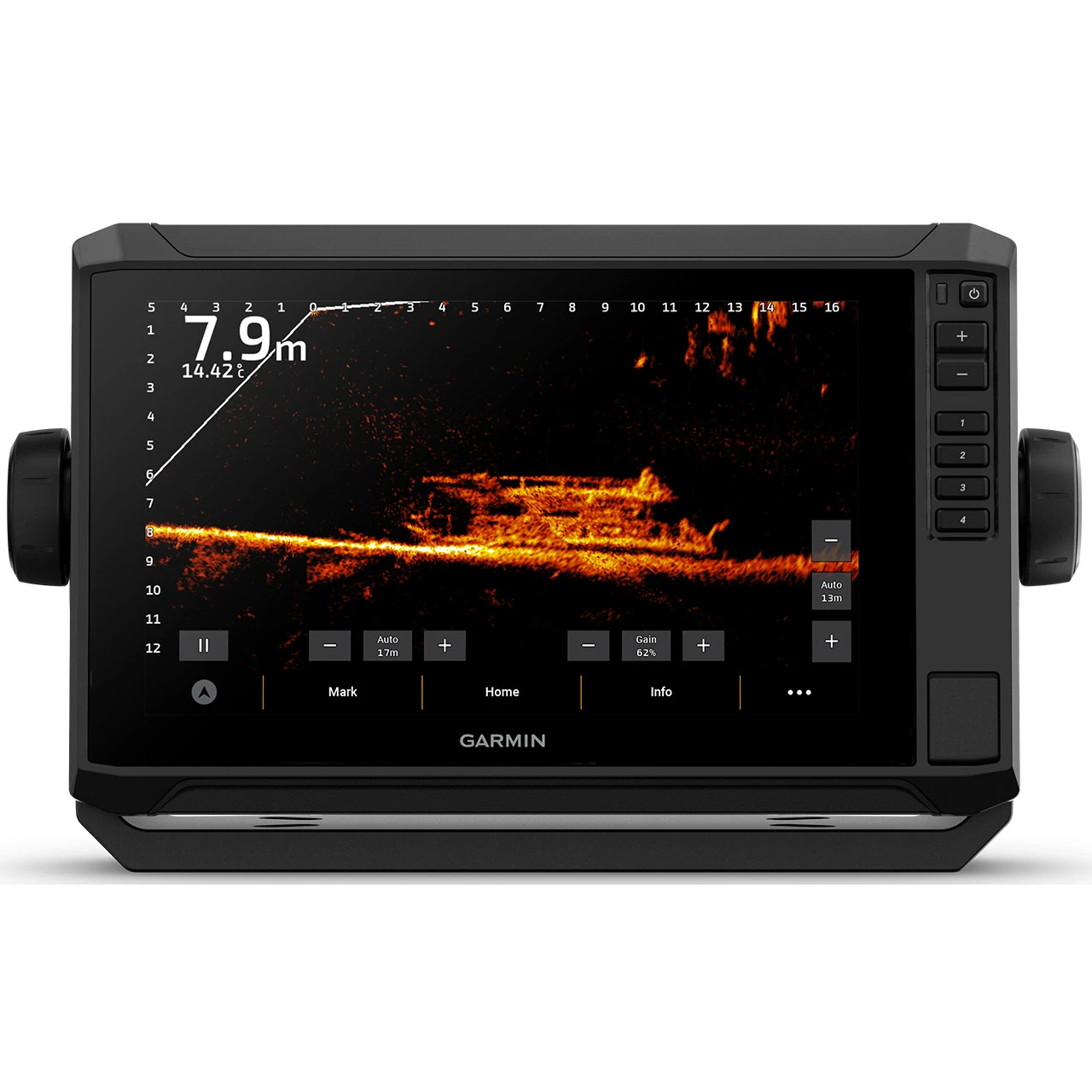
The UHD2 earns this award because it refuses to bundle two unrelated decisions into one. The 74sv and the 94sv share a head-unit family and control layout and differ mainly in screen size, 7 inch against 9 inch, which lets you settle cockpit fit without also settling sonar capability. The transducer is selected separately for the depth you fish, and the chart coverage is regional and matched to your waters. That is more work at the quote stage than a fixed bundle, and it is the reason this family suits a kayak installation where the mount and the fishing depth are both fixed before the display is.
| Screen size options | 7 inch (74sv) or 9 inch (94sv) |
|---|---|
| Unit type | Combined chartplotter and sonar head unit |
| Transducer | Selected separately for the fishing depth; not bundled at one fixed spec across the family |
| Chart coverage | Regional; must be matched to the buyer's waters |
Source: Garmin marine catalog. Resolution, weight and price are not stated in the documentation reviewed; confirm with the dealer alongside the transducer quote.
Why the transducer, not the screen size, decides what you see
Garmin's own installation documentation conditions attainable sonar depth on the transducer installed and the water conditions present. A 94sv does not read deeper than a 74sv because its screen is larger; a bigger display shows more of the same return at once, which is a different benefit entirely.
Garmin's transducer-selection guidance supports a transducer-led comparison rather than a display-led one, and that is how this family should be shopped. Decide the depth you fish, pick the transducer suited to it, then choose whichever body fits the cockpit.
What careful model identification buys you in a quote
The flip side of a flexible family is that similar model names and regional packages need careful identification in any quote. Two sellers can list what looks like the same unit and deliver different transducers and different chart regions, and neither listing is wrong. Put the 74sv and 94sv on the same quote request and require the seller to name the transducer and the regional chart package on each line before you compare prices.
If the quote does not name both, it has not answered the question you asked.
Best for. The angler who wants one integrated chartplotter and sonar platform and is willing to treat the body size and the transducer as two separate decisions.
Skip it if. You are choosing on screen size alone and do not want to verify what transducer and chart package a quote actually includes.
Lowrance Elite FS 7 / 9 - Best for an Imaging Expansion Path
Check Elite FS 9 + 3-in-1 on Amazon
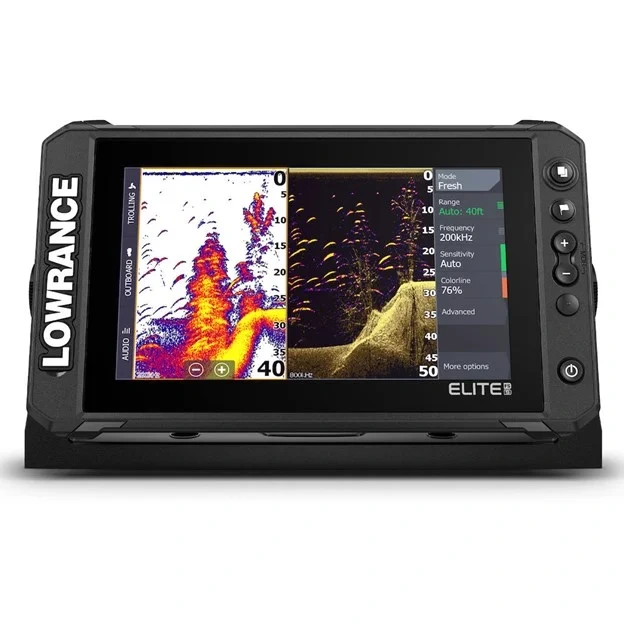
The Elite FS earns this award for being honest about where the expansion path starts and stops. In the regional listing reviewed, the 7 inch and 9 inch bodies ship with an Active Imaging 3-in-1 transducer, so traditional sonar and imaging both arrive in the base package rather than as a later purchase. Live sonar is the documented next step, and Lowrance's own listing keeps it separate as additional hardware, priced and installed on its own. That separation is the whole reason to shortlist this family: you get a useful working setup now and a defined upgrade you can cost out before committing.
| Screen size options | 7 inch or 9 inch |
|---|---|
| Included transducer, regional listing reviewed | Active Imaging 3-in-1 |
| Live sonar | Optional expansion, additional hardware required and priced separately |
| Chart coverage | Must be checked for local availability |
Source: Lowrance Elite FS 7 Active Imaging 3-in-1 regional product page. The bundle described applies to the market reviewed; confirm your region's package separately.
Why compatible and included are not the same line item
Live-sonar expansion needs extra hardware and its own installation, not a software unlock. A seller quoting the Elite FS as live-sonar compatible has described a capability, not a delivery, and the difference is a whole component, its wiring and its share of the battery budget.
Price the module as a separate line before you decide the base unit is affordable. Adding it also raises the running draw, which is the same demand the runtime table above is calculated against, so recalculate the trip rather than assuming the original battery still covers it.
The regional package is the thing you are actually buying
The bundle described here applies to the market reviewed, and local chart coverage still needs checking against the listing you order from. Confirm which Active Imaging transducer ships with your region's package, and confirm that the chart product covers your grounds, before the order goes in. Both answers are specific to a listing, not to the model name.
Best for. The angler who wants traditional sonar and imaging working now, with a documented route to live sonar if the fishing later demands it.
Skip it if. You are being quoted live-sonar compatible as though it meant live-sonar included, or your region's package has not been confirmed.
Humminbird XPLORE 9 - Best for a Fully Specified Package
Check Humminbird XPLORE 9 on Amazon
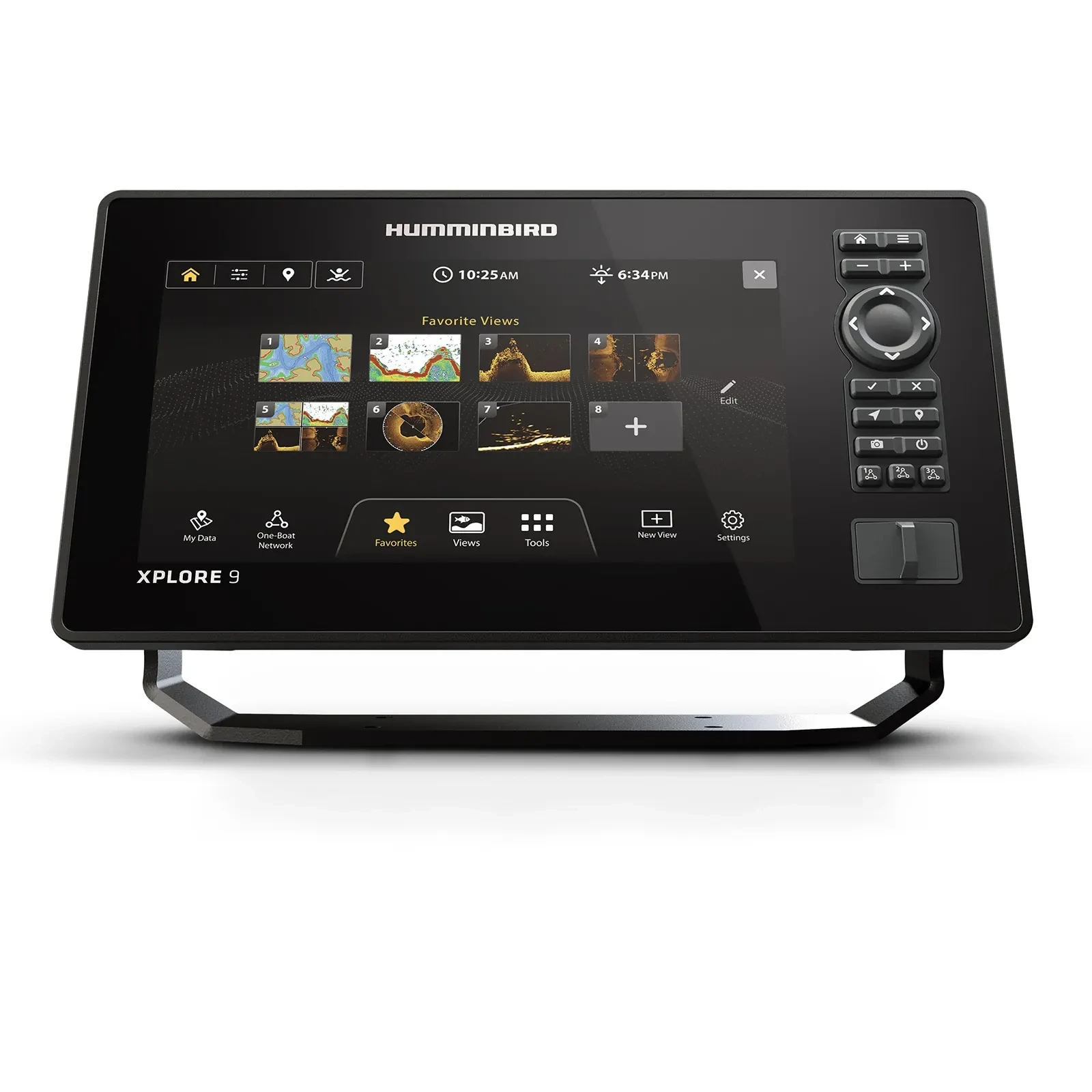
The XPLORE 9 wins this award on published contents rather than on any single capability. The reviewed CMSI+ package names the transducer it supplies, the XM 14 HW CMSI T, and names the map card, LakeMaster/CoastMaster, instead of describing a capability category and leaving you to work out what arrives in the box. The display is 9 inch at 1280 x 720, and both touch and keypad control are available. For a kayak buyer assembling a system around a fixed mount, knowing the exact model numbers before the order matters more than a long feature list.
| Screen size | 9 inch |
|---|---|
| Display resolution | 1280 x 720 |
| Included transducer, CMSI+ package | XM 14 HW CMSI T |
| Included map card | LakeMaster/CoastMaster |
| Controls | Touch and keypad |
Source: Humminbird XPLORE product page. Weight and price are not stated in the documentation reviewed; confirm the gimbal footprint and transducer fit with the dealer before ordering.
Why a named transducer changes what you can check
A package that publishes its transducer model can be checked against your hull before you pay for it. You can look up the XM 14 HW CMSI T's dimensions and mounting requirements and hold them against your kayak's stern or hull-through options, which is not possible when a listing only promises imaging capability.
That check is the one worth running twice. Humminbird publishes model-specific installation manuals that spell out the clearance and unobstructed-water requirements for each transducer, and the supplied gimbal still has to clear your seat position, your paddle stroke and your landing-net swing.
What the map card does not tell you about depth
The CoastMaster card's optional sonar capability describes chart content, not sonar performance. It does not establish what the supplied transducer will actually show at the depth you fish, and the two specifications should be evaluated separately. Confirm the card's coverage for your actual waters rather than trusting the product name, then judge the transducer on its own terms.
Best for. The angler who wants a 9 inch package with the transducer and coastal map card named up front rather than assembled from separate listings.
Skip it if. The transducer's mounting footprint will not clear your kayak without a dealer-reviewed installation change.
Where each candidate sits on screen size and power draw
| Candidate | Screen size options | Imaging path | Chart package | Where it sits |
|---|---|---|---|---|
| Garmin ECHOMAP UHD2 74sv / 94sv | 7 in or 9 in | Transducer selected separately per fishing depth | Regional, matched separately | Strongest when the display and sonar decisions need to be made independently |
| Lowrance Elite FS 7 / 9 | 7 in or 9 in | Active Imaging included; live sonar as a separately priced expansion | Regional, listing-specific | Strongest when a defined imaging-to-live-sonar upgrade path matters |
| Humminbird XPLORE 9 | 9 in only | Transducer and map card named in the package | LakeMaster/CoastMaster, included in CMSI+ | Strongest when a fully specified out-of-box package is worth more than assembling one |
No family in this table wins on screen-size flexibility, defined expansion path and fully published package contents at the same time, and that's the actual finding here, not a gap in the research. Pick the axis your fishing plan needs most, then verify the transducer and chart details against that specific quote.
Do you need a dedicated offshore unit, or would a smaller one do?
Not every kayak trip that leaves sight of the ramp needs a nine-inch chartplotter, an imaging transducer and a live-sonar expansion path. If your normal outing is a known reef edge, a repeatable depth, and a short run out and back, a seven-inch display with traditional CHIRP sonar and basic waypoint marking can answer the actual fishing question without the added battery draw, deck footprint and cost that a fuller package carries.
Buy the larger, more capable package when your fishing genuinely varies in depth and structure from trip to trip, when a chart/sonar split is a frequent working view rather than an occasional one, or when a documented live-sonar expansion path answers a specific task you already have. Size the purchase to the fishing you actually do most often, not to the most complete package available at a given price point.
Frequently asked questions
Is side imaging necessary for offshore kayak fishing?
Not for every trip. Side and down imaging present the water column differently than traditional sonar and need separate evaluation for a specific search task. If your fishing is mostly bottom and structure work at one known depth, prioritize the traditional sonar and transducer combination suited to that depth before paying for additional imaging modes.
Does a bigger screen mean deeper sonar range?
No. Screen size changes how much information you can see at once, not the sonar's working depth. Useful depth depends on the sounder, the compatible transducer, the settings in use and the water conditions on the day, per Garmin's own sonar power documentation. Compare the complete package at your fishing depth before choosing a display size.
Does the advertised maximum depth apply in saltwater?
Read the stated transducer and water-condition requirements before assuming so. Garmin's installation documentation explicitly conditions attainable sonar depth on the transducer used and the conditions present, rather than presenting an unqualified number as a guaranteed saltwater fishing depth.
Is GPS enough without a coastal chart package?
No. GPS position and waypoints are useful for navigation, but they are not detailed coastal chart coverage. NOAA's electronic charts carry charted features and depth information maintained through separate updates, so confirm your device's commercial chart package covers your coast and grounds before relying on GPS alone.
Should I add a live-sonar module right away?
Only if a specific fishing task needs it and the mount, display and power budget already support it. Live sonar adds hardware, wiring and battery draw beyond a standard sonar/chartplotter setup, so establishing a working basic system first is the more defensible starting point for most kayak anglers.
Which of the three families should I actually order?
Whichever one has an exact transducer suited to your fishing depth, chart coverage for your waters, and controls that fit your kayak's cockpit and seat position. Require those three details in the seller's quote before comparing prices, since the display name alone answers none of them.
Final verdict
A fish finder's printed maximum depth describes a sounder and one compatible transducer under favorable conditions, not what you will see fishing your actual structure from a kayak seat. The Garmin ECHOMAP UHD2 74sv or 94sv is the strongest starting shortlist once the transducer and chart region are matched to your depth. The Lowrance Elite FS 7 or 9 earns its place when a defined imaging-to-live-sonar path matters to your plan. The Humminbird XPLORE 9 earns its place when a fully named, published package is worth more to you than assembling one yourself. Run the battery math in amp-hours and the transducer clearance check from your own seat before you order any of them, not after.
Related reading
Sources
Specifications on this page were taken from manufacturer product, installation and support pages, consulted September 2026. Prices and specifications change; confirm current figures before buying.
- Garmin installation specifications (sonar depth conditioned on transducer and water conditions), www8.garmin.com, reviewed September 2026
- Garmin marine catalog, www8.garmin.com/marine/PDF/master.pdf, reviewed September 2026
- Garmin transducer selection guidance, support.garmin.com, reviewed September 2026
- Garmin sonar power guidance (screen size versus sonar capability), support.garmin.com, reviewed September 2026
- Garmin sonar frequency guidance, www8.garmin.com, reviewed September 2026
- Lowrance Elite FS 7 Active Imaging 3-in-1 product page, lowrance.com, reviewed September 2026
- Humminbird XPLORE product page, humminbird.johnsonoutdoors.com, reviewed September 2026
- Humminbird transducer installation manuals, humminbird.johnsonoutdoors.com/us/support/manuals, reviewed September 2026
- NOAA electronic navigational charts, nauticalcharts.noaa.gov, reviewed September 2026
Join The ReefReady Community
Get saltwater Fishing Guides, expert Buyers Guides, equipment recommendations, marine electronics insights, and practical gear tips delivered to your inbox.
No spam. Unsubscribe in one click.