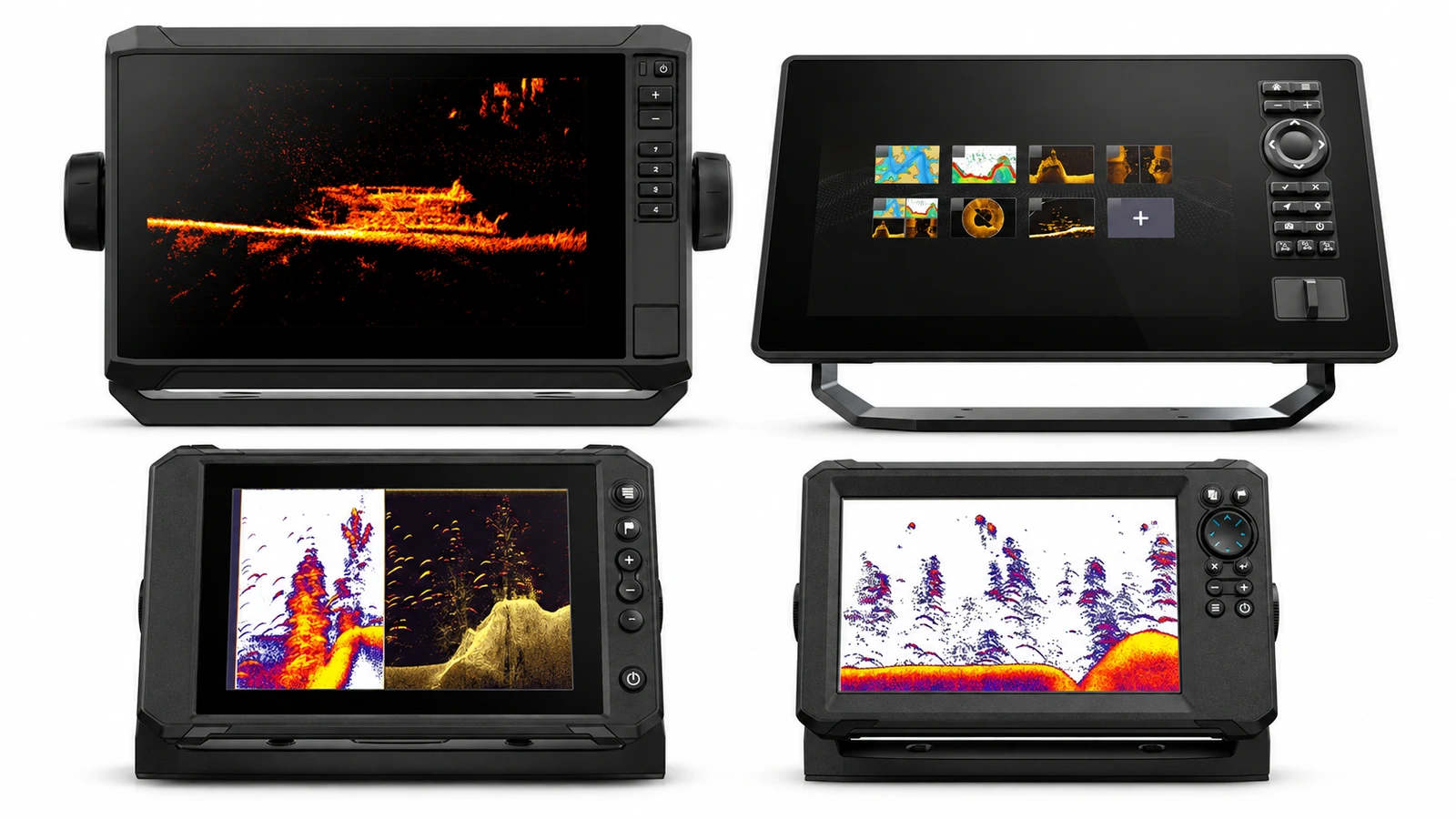
Best 9-Inch Fish Finders for Saltwater Kayaks: Why the Diagonal Number on the Box Isn't What Decides the Fit
Every nine-inch fish finder listing promises a bigger, easier-to-read screen for the exact moment your kayak drifts over structure and the display suddenly feels too small for the job.
The quick answer
The Garmin ECHOMAP UHD2 94sv is the nine-inch fish finder to shortlist first if you already run Garmin gear. A nine-inch diagonal buys roughly 65 percent more screen area than a seven-inch unit, and the ECHOMAP UHD2 line lets you assess that upgrade against equipment already in the kayak, provided the quote names the exact transducer and chart region. Anglers buying focused forward and down live sonar should choose the Lowrance Eagle Eye 9 instead, which delivers CHIRP, DownScan and live views from one transducer with no separate sonar module. The Lowrance Elite FS 9 and Humminbird XPLORE 9 are the other two systems worth a cockpit fit check.
Everything below is judged on one question: whether the full mounted footprint and its power draw actually fit your kayak, not whether the screen looks bigger.
Affiliate disclosure. ReefReadyGear earns a commission on some links below at no extra cost to you. This guide draws on manufacturer product pages and installation documentation, checked September 12, 2026, and it is a researched buying guide rather than a claim of first-hand testing.
A diagonal measurement isn't a fit guarantee
The screen that looks sharp on a showroom mount and the screen that clears your rod holders, pedal drive and battery box are frequently different purchases, and this guide is built around finding the second one.
The four awards
The four at a glance
| If you want | Consider | Why |
|---|---|---|
| A Garmin chartplotter and sonar package that matches gear you already run | Garmin ECHOMAP UHD2 94sv | A nine-inch ECHOMAP UHD2 configuration, with transducer-included and display-only bundles that need naming exactly on the quote |
| A conventional imaging system priced alongside a defined path to live sonar | Lowrance Elite FS 9 | Pairs the display with Active Imaging 3-in-1, with documented optional live-sonar hardware for later |
| The nine-inch display and a Humminbird or Minn Kota ecosystem already in the kayak | Humminbird XPLORE 9 | Touch and keypad control plus optional MEGA Live 2 integration |
| Focused forward and down live sonar in one dedicated package | Lowrance Eagle Eye 9 | CHIRP, DownScan and live views in a single transducer, not a side-imaging or expandable substitute |
On this page
- The quick answer
- The four awards
- The four at a glance
- How we chose
- What actually changes at nine inches?
- How much battery does a nine-inch setup actually need?
- What the bigger screen costs you elsewhere
- The overlooked check: mount the full footprint before you order
- Add a sonar pole only when it serves the installation
- The best 9-inch fish finders for a saltwater kayak
- Garmin ECHOMAP UHD2 94sv
- Lowrance Elite FS 9
- Humminbird XPLORE 9
- Lowrance Eagle Eye 9
- Where each nine-inch fish finder sits on the trade-off
- Does a 9-inch fish finder include live sonar?
- When a 7-inch screen does the job
- Frequently asked questions
- Final verdict
- Related reading
- Sources
How we chose
ReefReadyGear does not run a testing programme, and nothing here is presented as a first-hand result. Every specification is drawn from manufacturer product and manual pages, verified September 12, 2026. Where a claim is our calculation rather than a published figure, it's labelled as ours with the method shown.
- Screen diagonal and resolution are treated as separate specifications from mounting footprint and power draw, never as proxies for either
- Sonar or chartplotter capability that requires an optional module or transducer is flagged as optional, not counted as included in the base package
- Manufacturer catalog and installation documents are checked for the exact model configuration, since similar product names can span different hardware generations
- Where two manufacturer documents describe different requirements for the same feature, such as a base display versus an expanded live-sonar system, both are shown rather than one being treated as representative
Where two authoritative sources disagree, both are quoted and attributed rather than blended, and where a maker publishes no figure at all, we say so instead of estimating quietly.
You're running the edge of a nearshore reef ledge, pedal drive humming, chart on one half of the screen and side-scan on the other. The structure you marked on your last pass is somewhere under the hull right now, and you lean forward to read the depth number off a display that suddenly feels too small for the job you're asking it to do. That's the exact moment every nine-inch fish finder listing is written to answer.
The pitch is simple: buy a bigger screen, stop leaning forward, split the chart and sonar without either half turning into a squint. This guide exists to test that pitch against what a nine-inch unit actually demands from a kayak, not what it promises on the product page.
A nine-inch diagonal doesn't buy you nine inches of usefulness. At the same aspect ratio, it buys a screen with roughly 65 percent more area than a seven-inch unit, a body that needs a specific rear clearance behind whatever bracket holds it, and a power draw that has to come from a battery you're also expected to fit somewhere in the hull. The screen is the easy part of the purchase. The mount and the amp-hours are the part nobody prices for you before you order.
This guide publishes that math, walks through what the bigger screen costs you in weight, price and battery capacity next to a seven-inch alternative, and gives you the thirty-second mockup check that catches a bad fit before the return window closes.
What actually changes at nine inches?
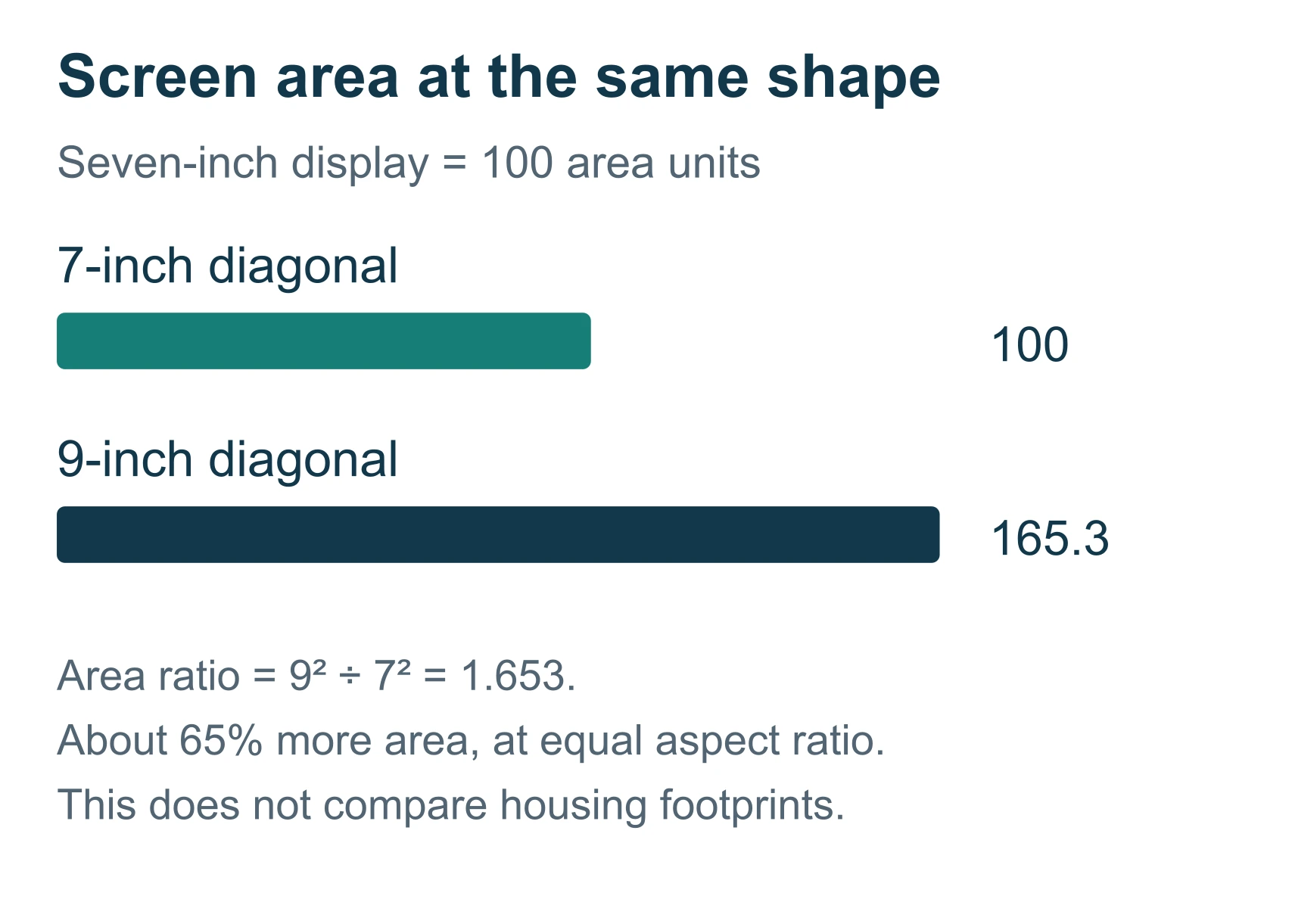
A nine-inch screen earns its place when a split-screen chart-and-sonar view becomes legible without leaning forward, and the added footprint still clears your cockpit; it does not earn its place on diagonal size alone. Nine inches is roughly the point where running two live views side by side, such as a forward-facing sonar panel next to a chart, stops requiring you to squint at either half. Below that size, a split screen on most kayak fish finders tends to shrink each pane past the point of comfortable reading from a seated, moving position. That is the genuine either/or this screen size introduces: split-view usability against mount footprint and power draw, not "bigger is always better."
Ask the dealer to show a seven-inch and a nine-inch candidate with equivalent layouts, using your normal glasses and a realistic viewing distance. Read the depth scale, identify a waypoint and operate the controls on each. A general impression that the larger display looks impressive is less useful than being able to perform those specific tasks comfortably from the seat you'll actually fish from.
Resolution and screen size are separate specifications, and neither one alone tells you which unit reads better on the water. Humminbird lists 1280 x 720 pixels for the XPLORE 9, while the Eagle Eye 9 listing specifies 1024 x 600. XPLORE specifications and Eagle Eye specifications confirm those figures, but a resolution listing does not establish a comparative sonar-performance winner between the two systems. Use the pixel counts to understand the hardware, then judge the actual views and controls on a demo unit. A screen can pack more detail into its panel and still sit too far from your eyes for that detail to matter.
How much battery does a nine-inch setup actually need?
Screen diagonal and sonar transmit wattage are not adequate battery-sizing inputs on their own, and almost no buying guide in this category runs the arithmetic that actually sizes a battery. This is that arithmetic, built as an editorial method you can rerun with your own shortlisted hardware's published power figures.
The method
- List the average power draw, in watts, for the display and every powered module you plan to run together, such as a separate sonar module or a network accessory, using each maker's documentation where it's published.
- Multiply the combined wattage by the number of hours you expect to run the system on a typical trip to get the watt-hours needed for that trip.
- Divide that watt-hour figure by the fraction of nominal battery capacity you're comfortable drawing down. Eighty percent is a common conservative figure for a lithium battery, though your specific battery's documentation may state a different usable range.
- Compare the result with the nominal watt-hour rating of any battery under consideration, calculated as volts multiplied by amp-hours, and treat that comparison as a first check rather than a final approval, since usable capacity, output rating, environmental provisions and charging still need separate verification against the battery's own manual.
These figures are an illustrative example built to demonstrate the method, not measured consumption for any of the four systems shortlisted in this guide.
| Component | Assumed demand (ours, illustrative) |
|---|---|
| Display | 20 W |
| Separate sonar module | 18 W |
| Other powered accessory | 2 W |
| Total | 40 W |
For six hours on the water, 40 W x 6 h = 240 Wh. At an assumed 80 percent usable fraction, 240 Wh / 0.8 = 300 Wh nominal is required by that arithmetic. A 12.8-volt battery rated at 30 Ah contains 384 Wh nominally (12.8 V x 30 Ah), which clears the 300 Wh figure in this illustrative example but does not by itself approve any specific battery for any specific kayak setup.
Every watt-hour figure in this section is our calculation from the method above, not a maker-published runtime for the Garmin, Lowrance or Humminbird systems reviewed here. Record brightness, connected modules and enabled sonar modes alongside any power measurement you take yourself; a low-brightness bench reading rarely represents the working setup you actually run outdoors, in daylight, with side-imaging or live sonar switched on. If the system grows later, such as adding a live-sonar module, recalculate demand rather than assuming the original battery remains sufficient.
What the bigger screen costs you elsewhere
Every advantage a nine-inch display offers over a seven-inch one is paid for somewhere in the installation. The larger panel sits in a larger body, which needs more rear clearance behind the mounting cradle; Garmin's own installation document specifies that clearance separately from the device's body depth, which is the kind of number a showroom display never shows you. Garmin installation dimensions
The same trade runs through power and price. A nine-inch unit with the same sonar functions as a seven-inch competitor typically carries a higher price for the display alone, and if the extra screen area pushes you toward running a live-sonar module or a second imaging source at the same time, the 40-to-300-watt-hour arithmetic in the section above scales up with it, not down. None of that is a defect in a specific nine-inch model. It's the trade every larger screen makes, and the honest response is to size the screen to the views you'll actually split on a typical trip, not to the largest diagonal available at a given price point.
The overlooked check: mount the full footprint before you order
Almost every buying guide in this category stops at screen size and resolution. The check that actually determines whether a nine-inch unit works on your kayak is where the full mounted body, gimbal knobs, bracket and cable connectors physically sit inside your cockpit, and it's rarely mentioned before the sale.
A cardboard rectangle representing only the screen is not enough. Cut a mockup of the full unit, including the gimbal knobs, the supporting mount and the connector area behind it, then try it with the seat set for fishing. Wear your PFD and bring the paddle through its normal stroke; if you pedal, check the entire pedaling motion and the drive's removal or stowage path with the mockup in place.
| Position | Useful check | Reason to reconsider |
|---|---|---|
| Close beside the seat | Readability and control reach | Interferes with paddle or fish landing |
| Farther forward | Clear working space | Requires leaning to read or operate |
| On a bridge-style support | Shared electronics location | Blocks drive access or entry |
| On an adjustable arm | Range of viewing positions | Support or locking arrangement is unsuitable |
These are assessment categories, not an endorsement of any specific unverified mount.
The thirty-second check almost nobody runs before ordering: rehearse a full fishing sequence with the mockup installed. Mark a position, put the rod down briefly, retrieve the net and bring a fish alongside, and note where the rod tip and line pass relative to the display. If a mount only works while you sit motionless with empty hands, it isn't ready for a fishing setup, and no diagonal-size upgrade fixes that on its own.
Add a sonar pole only when it serves the installation
An independent transducer pole can separate live-sonar aim from motor steering, but it adds a second control task beside the display rather than removing one. Assess the handle, transducer, stow location and cable route together before adding one to a nine-inch setup that's already asking a lot of your deck space.
RAILBLAZA's introduction of its Live Pole describes independent aiming as a stated purpose of that system, which is a reason to compare such mounts, not proof that a specific pole fits your specific kayak. RAILBLAZA independent-pole concept Check the exact transducer adapter before buying one; don't assume a newer sonar generation fits an older bracket just because the brand name is unchanged.
Cable routing needs to permit the kayak's approved range of motion without pulling on the connector or trapping the cable at a folding joint. Garmin's LVS34 cable instructions illustrate why a physical test fit matters more than a spec sheet here; use the manual that corresponds to your own transducer rather than assuming a similar-looking cable behaves the same way. Garmin cable-routing guidance
The best 9-inch fish finders for a saltwater kayak
Category boundary, stated plainly: nine-inch-diagonal fish finder and chartplotter systems documented for saltwater kayak use, evaluated on display and sonar package configuration, mounting requirements and power draw. Three are general-purpose chart-and-sonar systems from different brand ecosystems; the fourth is a focused live-sonar package built around one transducer.
A note on the overlap with our seven-inch guide. This size tier sits directly beside our companion article on seven-inch kayak fish finders, and the two guides cover overlapping brand lineups at different screen sizes, the same way our skiff and bay-boat guides handle overlap between adjacent hull sizes. If your cockpit space or battery budget is genuinely tight, read the seven-inch guide first; come back here once you've confirmed a nine-inch footprint and power budget actually fit your kayak.
Exact pricing and current package contents change by retailer and region, and are not published in this guide; confirm both directly with the manufacturer or an authorized dealer before ordering.
Garmin ECHOMAP UHD2 94sv - Best for an Existing Garmin Setup
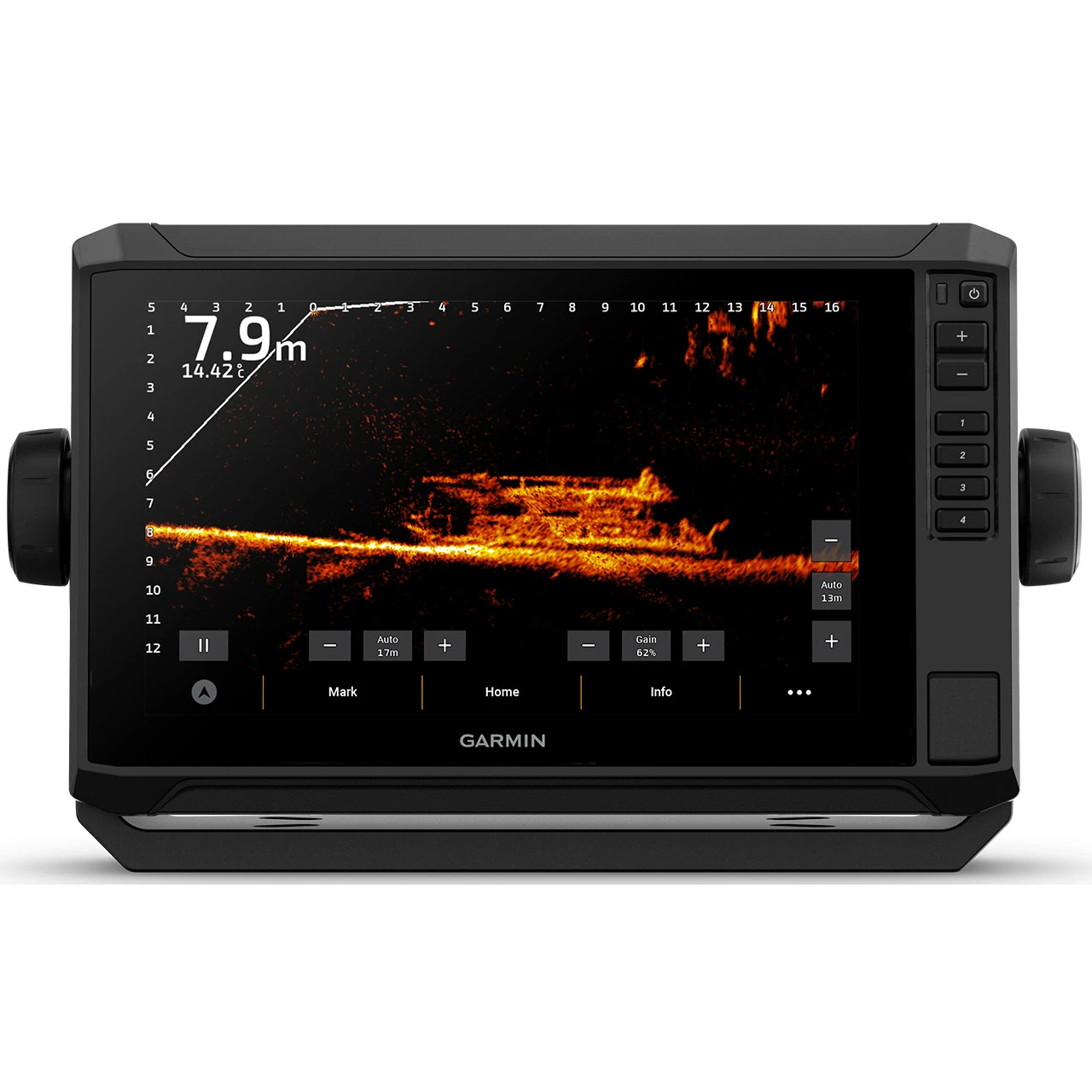
This one earns its award on continuity rather than on any single published number. The 94sv designation covers the nine-inch option inside the ECHOMAP UHD2 line, and Garmin's own catalog splits that line into transducer-included and display-only bundles, so the same model name can reach you as two quite different purchases. For an angler already running Garmin hardware, that split is an advantage: compatibility gets assessed against equipment you already own instead of starting an ecosystem from nothing. Neither screen resolution nor total power draw is published on the cited pages, which is worth knowing before you plan a battery around it.
| Screen diagonal | 9 in (94sv designation) |
|---|---|
| Configuration | Garmin's catalog distinguishes transducer-included and display-only bundles under this model line |
| Chart and transducer | Exact chart region and transducer must be named on the quote; not a single fixed specification across all 94sv listings |
| Installation clearance | Rear clearance behind the mounting cradle is specified separately from the device's body depth |
Source: Garmin nine-inch model and Garmin marine catalog. Screen resolution and total power draw are not published on the cited pages; confirm both with the dealer before ordering.
Why the wording on the quote decides this purchase
Similar product names run across the ECHOMAP UHD2 line, and generation checking is genuinely necessary before you order. A quote that says nothing more than "94sv bundle" has not told you which transducer is in the box, which chart region is loaded, or whether any optional sonar capability you were counting on needs a separate compatible transducer bought later.
Ask for the exact transducer model, the chart region and the supported accessories named as line items. If the seller cannot produce that list, the upgrade path being implied is one nobody has actually confirmed.
The clearance behind the cradle, not the body depth
Garmin's installation document specifies rear clearance behind the mounting cradle separately from the device's own body depth, which is exactly the number a showroom display never shows you. Garmin installation dimensions
Mock the unit up before you commit to a position, including that space behind the cradle and the full cable route.
Best for. The angler with an existing or planned Garmin chartplotter setup who wants package choices weighed against gear already in the kayak.
Skip it if. The quote names only a "94sv bundle" without specifying the transducer, chart region and supported accessories, because that phrasing hides a purchase you have not seen.
Lowrance Elite FS 9 - Best for a Defined Upgrade Path
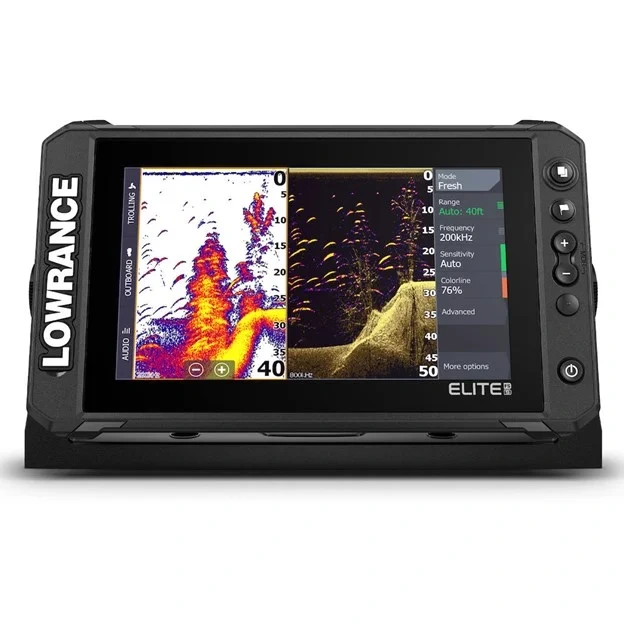
The Elite FS 9 earns this award because its expansion path is documented rather than implied. The reviewed package pairs the nine-inch display with an Active Imaging 3-in-1 transducer, and Lowrance separately describes optional live-sonar capability along with the additional hardware some imaging upgrades require. That lets you buy a conventional imaging system now and price the live-sonar step as a known quantity instead of committing to the full build on day one. Resolution is not published on the cited product page, so confirm it with the dealer if pixel count is part of your comparison.
| Screen diagonal | 9 in |
|---|---|
| Bundled transducer | Active Imaging 3-in-1, included in the reviewed package |
| Live sonar | Optional; Lowrance's documentation describes additional hardware requirements for some imaging upgrades |
| Resolution | Not published on the cited product page; confirm with the dealer |
Source: Elite FS 9 package.
Ask for two totals, not one price
Request a separate total for the initial installation and for the fully expanded installation, with the exact parts named in each. Otherwise you end up comparing an expanded system's capabilities against a basic bundle's price, which is the most common way this category gets misread.
What the expansion actually changes
Adding live sonar can change the mounting and the battery requirement substantially, and the watt-hour arithmetic earlier in this guide scales up with it rather than down. A second consideration sits alongside that: a regional basemap listing does not confirm your actual coastal chart package, and that needs verifying on its own. Buy around the system you intend to use, not the one a salesperson describes as an eventual possibility.
Best for. The angler who wants a conventional imaging package now with a documented, costed route to live sonar later.
Skip it if. Nobody can give you a straight answer on whether the planned live-sonar addition still fits your kayak once every required component is accounted for.
Humminbird XPLORE 9 - Best for an Existing Humminbird or Minn Kota Ecosystem
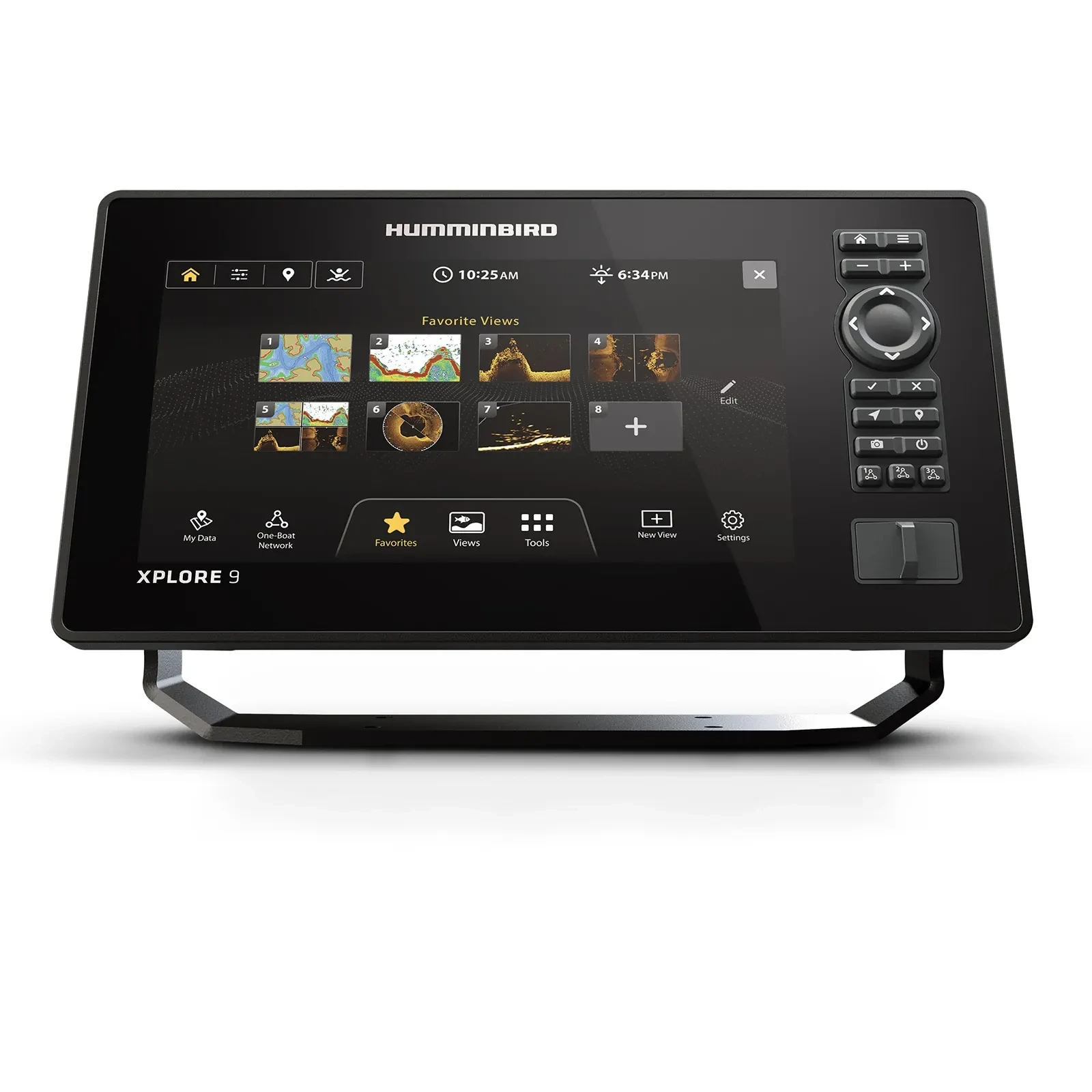
Check Humminbird XPLORE 9 on Amazon
XPLORE 9 wins this slot on fit with hardware you already own. Humminbird lists 1280 x 720 pixels for the panel, the highest resolution among the four units here, and the unit supports both touch and keypad operation rather than locking you into one interface. Optional MEGA Live 2 integration is the other reason it belongs on a Humminbird or Minn Kota-equipped kayak, though that compatibility depends on the specific existing hardware. The pixel count is a hardware fact, not a verdict on sonar performance.
| Screen diagonal | 9 in |
|---|---|
| Resolution | 1280 x 720 pixels, per Humminbird's specification listing |
| Control | Touch and keypad operation, both supported |
| Expansion | Optional MEGA Live 2 integration, compatibility dependent on existing Humminbird/Minn Kota hardware |
Source: XPLORE series overview and XPLORE specifications.
Two control methods are worth testing from the seat
Touch and keypad both being available matters more on a kayak than it does on a console. Wet hands, a moving seat and a screen you are reaching across all change which input you actually reach for, and you only find that out sitting in the boat. Test both from the position you fish from before deciding which one you would rely on.
Ecosystem compatibility is the claim to verify
Compatibility should never be assumed, because not every connected feature works with every older device in the lineup. Have the dealer list exactly which existing parts can stay and which must change, checked against current documentation rather than a familiar brand name on a motor or transducer. Humminbird compatibility resources
The extra hardware and network connections MEGA Live 2 integration needs also want physical space and their own share of the power budget, so price them into the cockpit plan and the battery math rather than treating them as a software switch.
Best for. The angler who wants both touch and keypad control available, or who already owns compatible Humminbird or Minn Kota equipment worth keeping.
Skip it if. The ecosystem advantage you are counting on turns out to need hardware your current setup does not support.
Lowrance Eagle Eye 9 - Best for Focused Live Sonar in One Package
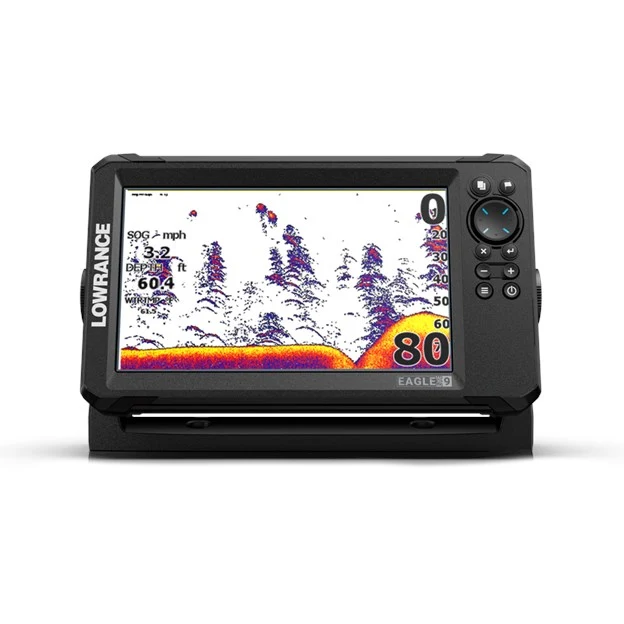
Check Lowrance Eagle Eye 9 on Amazon
Eagle Eye 9 is the outlier here, and that is the point of its award. It combines focused forward and down live views with CHIRP and DownScan in a single transducer, with no separate sonar module for those listed functions, which is what separates it from an Elite FS or ActiveTarget-style arrangement. Fewer boxes means a simpler mount and simpler wiring in the listed configuration. The panel is 1024 x 600 pixels per Lowrance's specification listing, lower than the XPLORE 9, and that matters less than whether the views themselves are the ones you fish with.
| Screen diagonal | 9 in |
|---|---|
| Resolution | 1024 x 600 pixels, per Lowrance's specification listing |
| Sonar package | Forward and down live views with CHIRP and DownScan in one transducer, no separate sonar module for those functions |
| SideScan | Not confirmed as included in the package; verify before assuming lateral imaging is part of it |
Source: Eagle Eye functions.
One transducer removes a module, not the planning
A simpler package still needs careful pole and cable planning. The absence of a separate sonar module does not make the transducer aim itself, and it does not create mounting space beside the seat that the cockpit did not already have.
What this package does not promise
Its documented views are not an all-features-equivalent replacement for the other three systems reviewed here, and SideScan should not be assumed to be included in the Eagle Eye transducer package. The general Eagle family name does not guarantee lateral imaging, so resolve that before purchase rather than after.
Best for. The angler whose fishing specifically calls for focused forward and down live sonar in one dedicated package.
Skip it if. Lateral structure imaging is a requirement for how you fish, since that is the one function this package does not confirm.
Where each nine-inch fish finder sits on the trade-off
| Model | Ecosystem commitment | Expansion complexity | Where it sits |
|---|---|---|---|
| Garmin ECHOMAP UHD2 94sv | High, tied to an existing or planned Garmin setup | Moderate: optional sonar needs the appropriate compatible transducer | Best when you're already committed to Garmin hardware |
| Lowrance Elite FS 9 | Moderate | High: a live-sonar add-on can change mounting and battery requirements substantially | Best when a staged upgrade path matters more than an all-in-one box on day one |
| Humminbird XPLORE 9 | High, tied to Humminbird/Minn Kota compatibility | Moderate: MEGA Live 2 integration depends on existing compatible gear | Best for an existing Humminbird or Minn Kota-equipped kayak |
| Lowrance Eagle Eye 9 | Low, self-contained package | Low: single transducer, no separate sonar module | Best for focused live views without taking on ecosystem lock-in |
No model here occupies the best of both columns at once, and that's the point of this table rather than a gap in the research: a low-commitment, low-complexity package like Eagle Eye buys that simplicity by giving up the expansion and ecosystem depth the other three offer.
Does a 9-inch fish finder include live sonar?
Not necessarily. A nine-inch display may support optional live sonar without including its transducer or any other required component in the base package. Read the exact package contents and compatibility list for the specific bundle you're quoted, keep included capability separate from future expansion, and price the mount, cables and power changes as part of the system you actually intend to use, not the system a display alone hints at.
Put the system on one page
| Required function | Display | Sonar hardware | Mechanical installation |
|---|---|---|---|
| Traditional sonar | Compatible head unit | Suitable transducer | Approved mounting method |
| Side/down imaging | Compatible capability | Exact imaging transducer | Clear operating geometry |
| Live sonar | Supported display and software | Exact transducer and any required module | Appropriate pole or other mount |
| Coastal charting | Supported chartplotter | Correct chart coverage | Readable display position |
Fill this table with actual part numbers before comparing final costs. Leave no requested function supported only by a vague phrase such as "upgrade-ready."
Compatibility may also depend on installed software as well as hardware; have the dealer identify the required software versions and update procedure for the exact equipment you're buying. Keep the initial installation straightforward and add only the connections needed for the functions you intend to use now. An unused network accessory adds another item to install and troubleshoot without improving the fishing task in front of you.
When a 7-inch screen does the job
Buy the nine-inch screen only when your working view is genuinely difficult to read at seven inches from your normal seated position; otherwise the seven-inch alternative deserves a fair trial first. For screens with the same aspect ratio, area scales with the square of the diagonal. The illustrative ratio is our own calculation from basic geometry: 9² / 7² = 81 / 49, or about 1.65. That means approximately 65 percent more area under that assumption, not 65 percent more sonar information and not a guaranteed improvement in readable detail.
| Cost | Nine-inch option | Seven-inch comparison |
|---|---|---|
| Display package | Same requested sonar functions | Same requested sonar functions |
| Chart coverage | Same region and terms | Same region and terms |
| Transducers/modules | Exact required parts | Exact required parts |
| Mounts | Complete cockpit installation | Complete cockpit installation |
| Power | Compatible battery and charger | Compatible battery and charger |
| Installation | Full scope | Full scope |
If the nine-inch screen makes your working view easier to read and still fits the cockpit comfortably, the premium may be worthwhile. If you mainly use one sonar view close to the seat, the seven-inch alternative deserves that fair trial before you pay for the larger screen, the larger mount and the larger battery it requires. Never compare a stripped nine-inch listing against a complete seven-inch kit, or the reverse; equal scope on both sides is what makes the price difference meaningful. Our companion guide to seven-inch kayak fish finders covers that size tier's own shortlist in full, and reading it alongside this one is the fastest way to decide which screen size actually matches your kayak.
Frequently asked questions
Is nine inches too large for a kayak?
Not automatically. The full mounted footprint and your actual operating sequence decide fit, not the diagonal measurement alone. Check the unit with cables connected and the seat positioned normally for fishing, using the cardboard mockup method described above, before assuming a nine-inch screen is too big or too small for your specific cockpit layout.
Will it read deeper than a seven-inch model?
Not because of screen size alone. Depth-reading performance comes from the sounder, the transducer and the stated operating conditions, none of which scale automatically with diagonal inches. Compare those three specifications directly between any two candidates rather than assuming the larger screen reads deeper water.
Can I reuse my old transducer?
Only when exact compatibility is confirmed, including any required adapter between the old hardware and the new display. Have the seller identify your old transducer by its specific model number rather than relying on a photograph alone, since visually similar transducers across generations are not always interchangeable.
Does Eagle Eye replace every live-sonar system?
No. Compare its documented focused forward and down views and package functions directly against whatever system you otherwise intended to buy. Eagle Eye is a dedicated package built around one transducer, and it isn't a drop-in substitute for a fully expandable side-imaging or ActiveTarget-style setup.
Should I choose the highest resolution?
Use resolution as one specification among several, not the deciding one. The actual screen layout, your realistic viewing distance, the control scheme and the sonar package behind the display matter more to real-world use than selecting purely by pixel count, as the XPLORE 9 and Eagle Eye 9 comparison above shows.
Which nine-inch unit is the best value?
The one that delivers your required functions at the lowest acceptable complete-system cost, not the one with the lowest sticker price on the display alone. Price the Garmin, Lowrance and Humminbird configurations on equal scope using the cost table above, then make the final choice after a cockpit fit check and an in-person interface demonstration.
Final verdict
The diagonal measurement on a nine-inch fish finder's box tells you almost nothing about whether it will actually fit your kayak, run long enough on your battery, or read any better than a seven-inch alternative. The Garmin ECHOMAP UHD2 94sv, Lowrance Elite FS 9 and Humminbird XPLORE 9 are the three general-purpose systems worth a cockpit fit check, each tied most strongly to a different existing ecosystem; the Lowrance Eagle Eye 9 belongs on the shortlist only when focused live sonar in one transducer is specifically the function you're after. Run the full-footprint mockup test and the battery-sizing math from this guide before you order any of them, and read the seven-inch comparison first if your cockpit or your amp-hour budget is already tight.
Related reading
Sources
Specifications on this page were taken from manufacturer product and installation documentation, checked September 2026. Prices and specifications change; confirm current figures before buying.
- Garmin ECHOMAP UHD2 94sv product page, garmin.com, reviewed September 2026
- Garmin marine equipment catalog (PDF), garmin.com, reviewed September 2026
- Garmin ECHOMAP UHD2 installation dimensions documentation, garmin.com, reviewed September 2026
- Garmin LVS34 transducer cable-routing installation guidance, garmin.com, reviewed September 2026
- Lowrance Elite FS 9 Active Imaging 3-in-1 package page, lowrance.com, reviewed September 2026
- Lowrance Eagle Eye 9 Live package and specifications page, lowrance.com, reviewed September 2026
- Humminbird XPLORE series overview, humminbird.johnsonoutdoors.com, reviewed September 2026
- Humminbird XPLORE specifications page, humminbird.johnsonoutdoors.com, reviewed September 2026
- Humminbird compatibility and manuals resource, humminbird.johnsonoutdoors.com/us/support/manuals, reviewed September 2026
- RAILBLAZA Hexx Live Pole launch announcement, railblaza.com, reviewed September 2026
Join The ReefReady Community
Get saltwater Fishing Guides, expert Buyers Guides, equipment recommendations, marine electronics insights, and practical gear tips delivered to your inbox.
No spam. Unsubscribe in one click.